

Salesforce MRP: plan materials from live orders, stock and supply
Axolt MRP runs natively inside Salesforce. It plans from the same sales orders, inventory, bills of materials and purchase orders your teams already use, so shortages surface while there is still time to act.
Plan materials from live demand, supply and stock on one shared Salesforce data model.
Salesforce MRP is material requirements planning that runs inside Salesforce. It works out what materials and sub-assemblies you need, how many and by when, using live demand from sales orders and forecasts, stock on hand, open purchase and work orders, bills of materials and lead times. Axolt MRP then raises purchase and production suggestions against the gaps it finds, on the same platform as your customers, inventory and finance.
Plans that react too late
Most MRP systems plan in batches. Between runs, a supplier slips, a large order lands or production falls behind, and the plan no longer matches reality.
Demand sits in CRM
New orders reach the plan late when demand has to be synced into a separate planning system.
Inventory is already out of date
Planners are asked to trust the last sync or count instead of the stock position now.
Exceptions live in spreadsheets
Decisions depend on who reviewed which exception, and when.
Purchasing acts elsewhere
Orders go out late or in the wrong quantities when action sits outside the planning system.
What fragmented planning costs
The cause is rarely a lack of data. It is the gap between the systems that hold demand, stock and supply, and the time it takes to bring them together.
Plan from records that already live in Salesforce
There is nothing to import before a plan can be trusted.
Demand is captured
Confirmed sales orders and forecasts feed the plan as they change in Salesforce.
Supply is checked
Stock on hand by warehouse, open purchase orders and work orders in progress are netted against demand.
Gaps are identified
Shortages are calculated through every level of the bill of materials, offset by lead times, with capacity constraints shown alongside.
Suggestions are raised
Purchase and production suggestions are created for each gap, with quantities and required dates, for release by planners or approval rules.
Execution is tracked
Purchase orders, work orders and their cost impact stay visible to operations, purchasing and finance.
Because MRP shares one data model with BOM management, production planning, capacity planning, purchase orders and manufacturing finance, every suggestion is made with the full picture.
How MRP calculates what you need
Every MRP follows the same logic: netting, bill of materials explosion, lead-time offsetting, lot sizing and safety stock.
The order: A customer orders 100 pumps (P-100), due in week 6. Assembly takes one week.
The bill of materials: Each pump needs one motor (M-10, bought in, lead time three weeks) and two brackets (B-20, made in-house in one week from 0.5 kg of steel each). Steel (S-5) is bought in 25 kg bars with a two-week lead time.
The stock position: 10 pumps, 30 motors, 40 brackets and 20 kg of steel are on hand. Another 20 motors are already on order, arriving in week 2. The motor has a safety stock of 10.
P-100 pump: 100 required by week 6; 10 on hand; net 90; production order for 90; release by week 5.
M-10 motor: 90 required by week 5; 30 on hand + 20 on order - 10 safety stock = 40 available; net 50; purchase 50; release by week 2.
B-20 bracket: 180 required by week 5; 40 on hand; net 140; production order for 140; release by week 4.
S-5 steel: 70 kg required by week 4; 20 kg on hand; net 50 kg; purchase 50 kg as two 25 kg bars; release by week 2.
Illustrative example.
The MRP logic
Netting
Gross demand minus stock and open supply gives the net requirement.
BOM explosion
A finished product requirement creates requirements for its components, level by level.
Lead-time offsetting
Each suggestion is dated back from when it is needed by its lead time.
Lot sizing and safety stock
Quantities are adjusted to buying rules and protected stock levels.
How the plan updates matters
When inputs change, the age of the data matters as much as the planning logic.
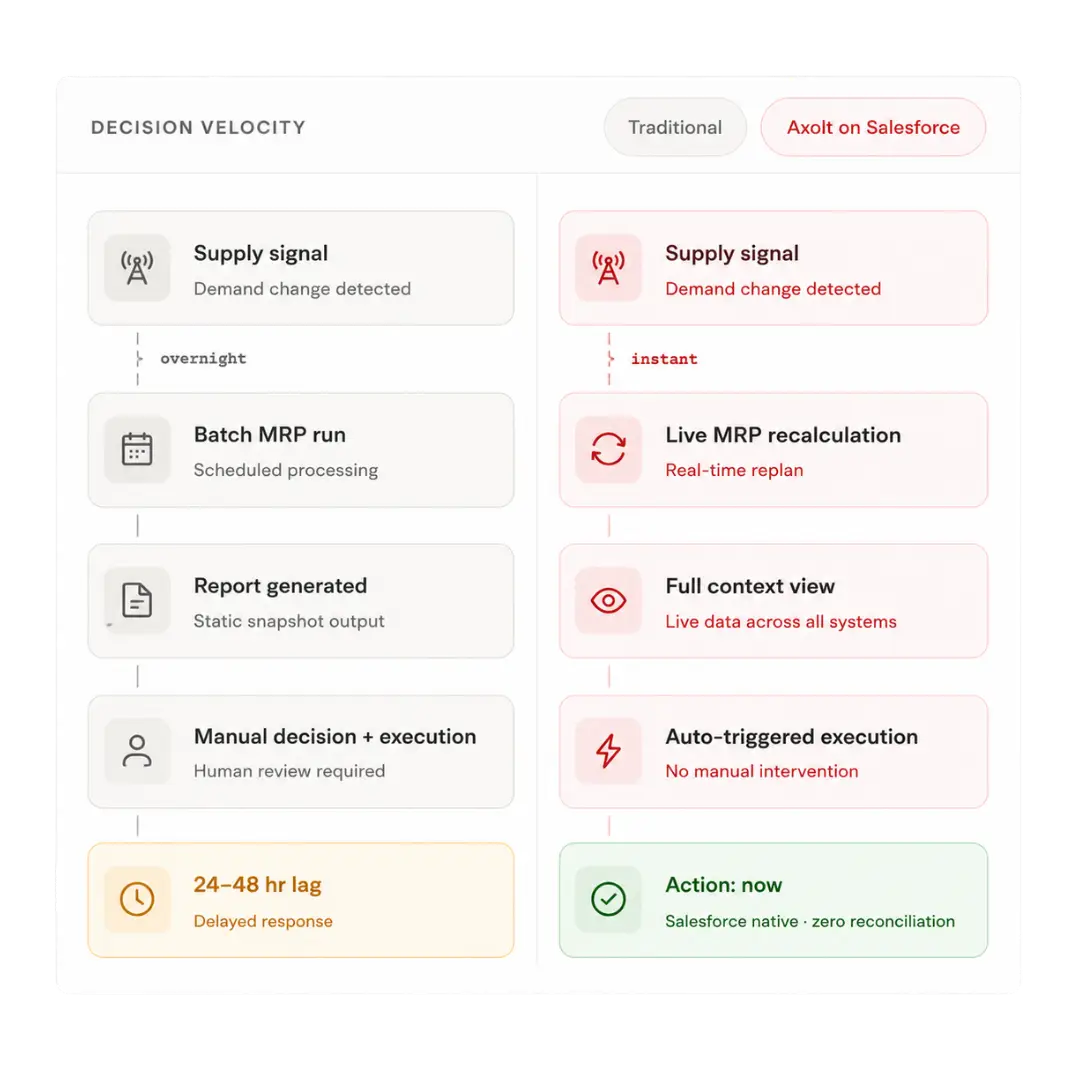
Batch MRP
Updates on a schedule, often overnight
Demand is synced from a CRM into the planning system
Inventory reflects the last count or sync
Exceptions are exported and reviewed in spreadsheets
Action is taken in a different system
Cost impact is visible after the fact
Result: decisions are based on a plan that may already be out of date
Continuous planning
Updates as demand and supply change
Salesforce sales orders and forecasts feed the plan directly
Live stock is considered across warehouses
Exceptions are shown with the order, item and supplier in Salesforce
Purchase and work orders are raised on the same platform
Cost impact is visible before a purchase order is released
Result: planners can act from the current position
MRP does not need to wait for a separate system to catch up. Demand, supply, execution and finance share one Salesforce data model.
Available is not the same as ready
You can have stock on the shelf and still be unable to build. One missing component stops the line.
Clear to Build checks the full BOM before release
It checks material availability across every component of the bill of materials before a work order is released.
Explore Clear to BuildFinish what you start
Validates availability for every component of the work order
Shows missing or short components before release
Connects shortages to purchase orders so gaps can be filled quickly
Prevents starting production you cannot finish
You do not start production unless you can finish it.
MRP planning and execution on one platform
Live demand signals, continuous planning and connected execution keep the plan current and actionable.
Live demand signals
New and changed Salesforce sales orders flow into planning without imports or sync jobs.
Continuous planning
Supply and demand changes trigger recalculation, so the plan reflects the current position.
Execution-linked workflows
Purchase and production suggestions sit next to the purchase orders and work orders that carry them out.
One version of the truth
CRM, inventory, manufacturing, purchasing and finance share one data model, with no reconciliation between systems.
Cost visibility before action
Connected manufacturing finance shows the cost of supply and replenishment decisions before purchase orders are released.
Agentforce ready
Axo AI on Agentforce can analyse demand, propose purchase orders and schedule changes, and record an audit trail while people approve consequential actions.
MRP plans. Salesforce MES executes.
MRP decides what needs to be bought and made. Salesforce MES controls what happens on the shop floor: work orders, material consumption, work in progress and quality.
Planning, purchasing and manufacturing share the same data
Axolt connects MRP, production planning, MES, inventory, purchasing and finance in one platform.
Questions to ask in every demo, including ours
Compare the planning rules, traceability and exception handling that determine whether an MRP system works in your operation.
Safety stock
A protected quantity MRP will not plan to use. Ask: How is safety stock set per item and warehouse?
Lot sizing
Rules such as fixed quantities, minimums or multiples. Ask: Which lot-sizing rules are supported?
Lead times
Purchase, production and transfer lead times. Ask: Can lead times differ by supplier and site?
Planning horizon
How far ahead MRP plans. Ask: How is the horizon set, and can it differ by item?
Pegging
Which demand each supply order is for. Ask: Can a planner trace a purchase order back to the customer order?
Multi-site planning
Planning across warehouses and transfers. Ask: Are transfers between sites suggested?
Exception messages
Advice to expedite, defer or cancel. Ask: How are exceptions shown and prioritised?
When reacting late is not an option
Built for make-to-order manufacturers, complex multi-level BOMs, variable demand and long or uncertain supply.
Make-to-order
Every order is different, so planning must respond to each one as it arrives.
Complex multi-level BOMs
Shortages hide several levels down; explosion and netting must reach every level.
Variable demand
Seasonal, project-based and lumpy demand makes yesterday’s plan unreliable.
Long or uncertain supply
Multi-tier suppliers and long lead times need early, accurate purchase signals.
Northern Wide Plank
Northern Wide Plank faced tight production schedules, disjointed processes and manual accounting.
With Axolt, the team schedules manufacturing orders with live status and traceability.
Bills of materials and work orders support manual or automatic stock allocation.
Timed process cycles support more accurate forecasting. Read the case study.
Axolt MRP eliminates the lag between signal and action.
Planning with a person in control
Axo AI on Agentforce helps planners analyse demand and propose actions, with approvals for consequential changes.
“Cover all critical items for the next 30 days.”
Demand analysed
Across active orders, forecasts, stock and open supply
Purchase orders proposed
For the gaps the plan identifies
Schedule changes proposed
Against current capacity and requirements
Audit trail recorded
People approve consequential actions
Agentforce turns a planner’s request into a traceable recommendation, while keeping people responsible for release decisions.
Explore the Connected Manufacturing Platform
Salesforce MRP works alongside ERP, production planning, capacity, and manufacturing finance. Explore the modules connected to material availability and production readiness.
Manufacturing ERP
The connected operational platform for planning, inventory, purchasing, and finance.
Production Planning
Coordinate scheduling and execution against live material availability.
Manufacturing Finance
Real-time cost and financial visibility for every supply decision.
BOM Management
Manage product structures and component dependencies.
Salesforce MES
Connect planning to work orders, material consumption, work in progress and quality on the shop floor.
Capacity Planning
Balance labor and machine availability with real demand.
MRP vs ERP
See how material planning and the wider ERP operating model work together.
Clear to Build
Validate build readiness before a work order is released.
Salesforce MRP FAQs
What is Salesforce MRP?
Salesforce MRP is material requirements planning that runs natively inside Salesforce. Axolt uses live sales orders, inventory, bills of materials and purchase orders on the same platform to calculate what you need, when you need it, and what to buy or build.
What inputs does MRP need?
Demand from sales orders and forecasts, bills of materials, stock on hand, open purchase and work orders, lead times, and planning rules such as safety stock and lot sizes. In Axolt these already live in Salesforce.
How is Axolt MRP different from batch MRP?
Batch MRP recalculates on a schedule, so plans can be based on yesterday’s position. Axolt recalculates as orders and supply change, and raises purchase and production suggestions on the same platform where they are carried out.
Do I need an integration between my CRM and MRP?
No. Because Axolt is built on Salesforce, demand comes directly from your sales orders, with no middleware or reconciliation.
Does Salesforce MRP connect to finance?
Yes. Axolt connects MRP with manufacturing finance, so the cost impact of supply decisions is visible before a purchase order is released.
What is Clear to Build?
A check that confirms every component of a work order is available before it is released, so you do not start production you cannot finish.
Does Axolt MRP work with Agentforce?
Yes. Planners can ask Axo AI on Agentforce to analyse demand and propose purchase orders and schedule changes, with an audit trail and approval before consequential actions.
What is the difference between MRP and a master production schedule?
The master production schedule states what finished products will be made and when. MRP works out the materials and sub-assemblies needed to deliver that schedule.
See your own bill of materials planned inside Salesforce
In a 40-minute demo we take one of your products, a real order and your stock position, and show the suggestions Axolt MRP raises, Clear to Build, and the cost impact before anything is released.