

Salesforce-native finance ERP
Adjustment Entries on Salesforce for Accurate Financial Reporting
A clearer close, with every adjustment accounted for.
Connect adjustments to your ledger, bank reconciliation, and reporting on one Salesforce ERP platform. Keep entries traceable from creation and approval through posting.
Manual and recurring entries
Approval and posting history
Current financial reporting
Recurring accrual
Scheduled adjustment prepared for review.
Scheduled
Revenue reclassification
Period-end entry linked to the ledger.
Reviewed
Prepaid allocation
Expense allocated to the right period.
Pending
Intercompany adjustment
Approval and posting history retained.
Approved
Every entry accounted for. Create, approve, post, and trace adjustments in one place.
Ledger
Approvals
Periods
Audit history
Flexible entries
Manual and recurring journals
Full history
Every change tracked
Financial controls
Approvals and governance
Axo AI
Anomaly detection
Adjustment entries stay connected to your ledger, reconciliation, reporting, and finance operations inside Salesforce.
The problem
Manual Adjustments Create Risk
Structured workflows give finance teams a clear record of each entry and a more consistent period close.
Spreadsheet-based adjustments
Manual journals are harder to review and apply consistently across periods.
No approval visibility
Unstructured changes can leave teams without clear evidence of who approved an entry.
Recurring entries done manually
Re-entering accruals, amortizations, and deferrals creates avoidable work.
Disconnected from the ledger
When adjustments sit outside the core accounting system, reconciliation becomes harder.
The impact on your finance team
Delayed financial close cycles
Inaccurate P&L and balance sheet reporting
Audit findings and compliance gaps
Reconciliation discrepancies each period
Excessive manual accounting effort
Less confidence in period-end figures
Manage, approve, and post adjustments inside the Salesforce ERP platform with traceability and current ledger data.
Core capabilities
Everything Finance Needs to Close with Confidence
Create, approve, and track every adjustment within connected finance workflows.
Manual & Automated Entries
Create manual journals and automated entries across finance ERP workflows in one place with approval visibility.
Manual journal adjustments
Automated recurring entries
Period-end processing
Traceable entry history
Flexibility with clear control
Automated Recurring Adjustments
Automate repeatable accounting events and connect period-end planning to budgeting and forecasting.
Monthly accruals
Deferred revenue entries
Prepaid allocations
Amortization entries
A faster close with less repetitive work
Full Audit Trail Visibility
Track each adjustment with timestamps, user activity, approvals, and posting history.
Timestamped history
User activity tracking
Approval workflows
Journal traceability
Audit-ready entry history
Compliance & Financial Governance
Use structured processes to support internal controls and reporting policies across entities and periods.
Policy-aligned adjustments
Structured approvals
Documented changes
Reduced reporting risk
Stronger financial governance
Product experience
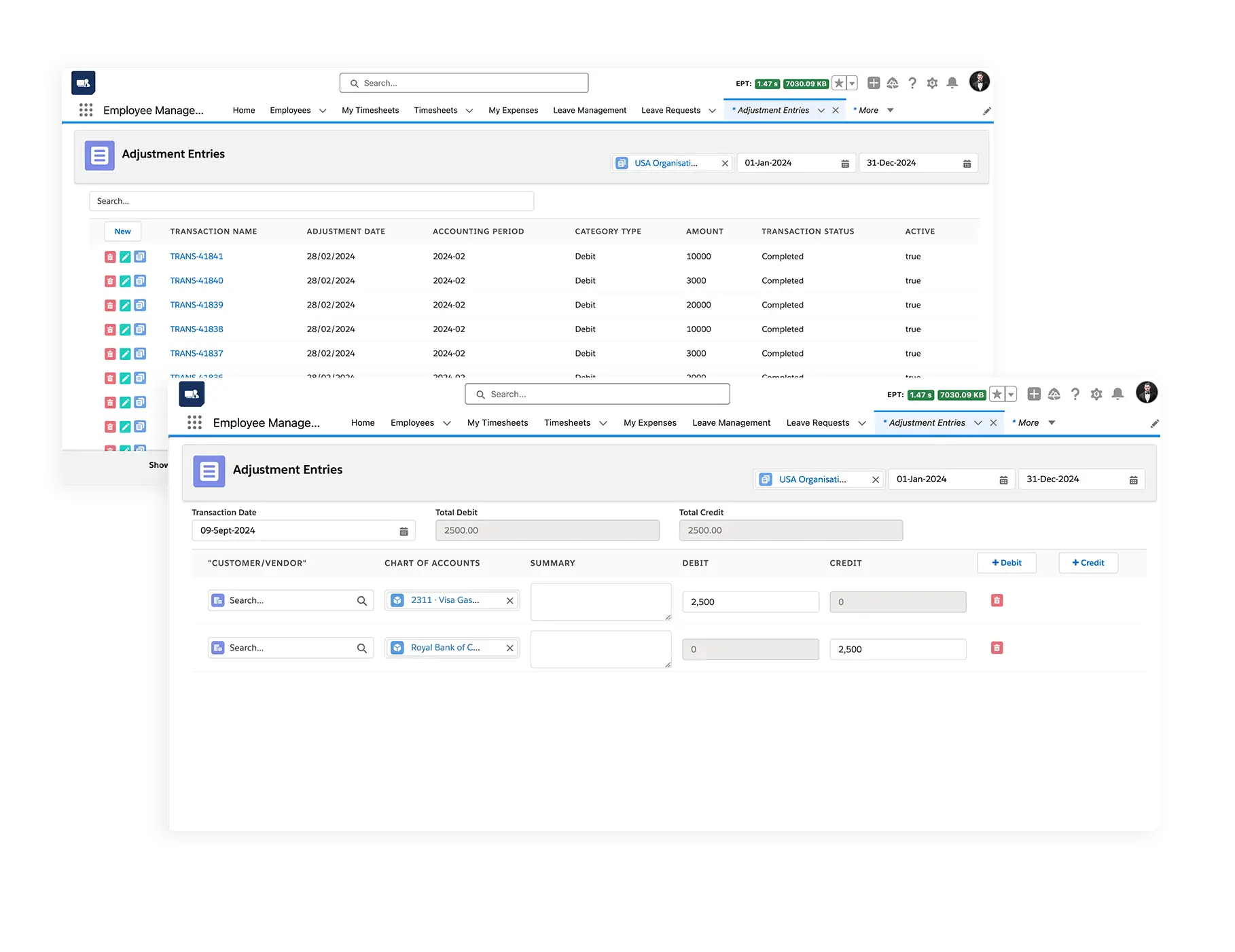
Manage Every Adjustment in One Place
See entry status, approvals, history, and ledger impact together inside Salesforce.
Unified adjustment register
Find manual and recurring entries by period, type, status, or entity.
Approval workflow view
See each entry’s reviewer, approval stage, and outstanding actions.
Ledger impact visibility
Understand the reporting effect of an adjustment before posting.
Axo AI on Agentforce
AI-Powered Finance Workflows with Audit Accountability
Axo AI helps finance teams spot anomalies, recommend corrections, and automate repetitive accounting steps while keeping activity traceable.
Explore Axo AI →Spot unusual activity
Flag entries that differ from the expected pattern for review.
Recommend corrections
Suggest reclassifications informed by connected operational data.
Automate recurring work
Support repeated accruals, deferrals, and amortizations.
Keep the audit trail
Record who reviewed each action and when it was posted.
Connected finance
Adjustment Entries Across Your Finance Ecosystem
Keep journals connected to the financial and operational records they affect.
Bank Reconciliation
Adjustments support a clearer reconciliation and close.
Financial Reporting
See adjustments reflected in P&L, balance sheet, and cash-flow views.
Budgeting & Forecasting
Compare adjusted figures with plans across departments and periods.
Built for
Operational Businesses That Need Financial Precision
Adjustment entries help teams keep finance accurate as operations change.
Manufacturing
Track production cost adjustments, inventory valuation changes, and operational accounting.
Healthcare & Pharma
Support accrual tracking and financial transparency across entities.
Distribution
Handle multi-location entries and inventory-related financial corrections at scale.
Food & Beverage
Track changing inventory costs, operational adjustments, and expense allocations.
Services
Manage project accruals, deferred revenue, and operational accounting entries.
Business outcomes
Results Your Finance Team Can Measure
Bring speed, accuracy, and accountability to period-end work.
Faster financial close
Recurring entries and structured reviews reduce repetitive period-end work.
Clearer reporting
Consistent adjustments support more reliable financial statements.
Better audit readiness
Timestamps and approval history make each entry easier to trace.
Stronger controls
Review steps and policy alignment support financial governance.
Connected finance workflows
Keep the Close Connected
Continue from adjustment entries into the finance processes that use the same records.
Bank Reconciliation
Connect adjustments to matching and month-end close.
Budgeting & Forecasting
Keep plans aligned with current financial activity.
Ready to improve financial accuracy?
A Clearer Close.
More Confident Reporting.
Simplify adjustments, strengthen controls, and keep financial records accurate in Salesforce.
Faster close
Clearer reporting
Audit-ready history
Stronger controls